I’ve had this problem for a while, that Mac OS X Mail (the native mail client in OS X) sends emails that other email clients don’t recognize as attachments, but as embedded pictures. This has been really frustrating, because if I’m sending an image to a client that needs to be saved on the client’s computer, he or she is unable to do so because the image is not a “real attachment”.
So, here are the facts: Wether an image is embedded in the email or not, it’s still an attachment. Thus, OS X Mail does nothing wrong when it embeds the image, other clients simply doesn’t want to understand that it’s still an attachment. The clients (read: “Outlook”) offer no way to save the image other than to right click it inside the email, but that only generates a .bmp that’s scaled down to the email size in pixel width.
Please note that it doesn’t matter if you click the Attachment button in the main taskbar or simply drag the images to the email body.
The solution: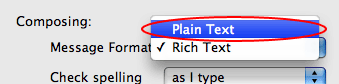
The reason my images were getting embedded was because I was using some signatures with colors in them. As soon as you set the font, a color or similar, Mail turns the email into a “Rich Text” email, which basically means it’s a HTML email. So when you attach images to such an email, Mail generates an tag for that image, thus embedding it into the email itself. You can avoid this easily by just using Plain Text emails (see screenshot).
You can also try to simply don’t use any formatting in the email, including your signature.
Hope this helps. 🙂
Thank you. Thank you. Thank you.
You're welcome! 🙂
THANKS! SO SIMPLE BUT SO DIFFICULT 🙂
I know. Stupid Mail 🙂
test
Its taken me 7 months to get this right! My whole office is happy too! especially client service who uses pc 🙂
you're the man, great solution!!!
Thank you so much, very informative!
Here another problem, my sign with this configuration appear as attachment 🙁
Oh Thank God.. You da Man!
Oh Thank God.. You da Man!
Sometimes it’s really that simple, isn’t it? I feel a little stupid for not thinking of this myself/earlier, though.
Yeah, it's that simple 🙂
So helpful, Thank you
Ok, but clearly Microsoft has solved the problem of being able to have rich text and html emails that ALSO allow attachments to deliver properly, whereas MAC has NOT solved this problem effectively. I love MAC, but why haven't they set this up properly? I hate to see Microsoft solve something that MAC hasn't!
I'm 100% with you.
Hi
I found this solution, tried it and it works immediately.
"Mail.app by default displays images inline, and most email clients won’t recognize them as attachments. If you right click (or ctrl click with a one button mouse) on the image you can select to view the image as icon, which makes it behave like a normal attachment. To make this the default behavior you’ll need to use the Terminal to set the preference. Terminal is in Applications>Utilities. Open Terminal and type:
defaults write com.apple.mail DisableInlineAttachmentViewing -bool yes
That will make every attachment you send act like an attachment instead of a pretty unusable decoration."
This is from another user. See it here:
Disable Mac Mail.app Inline Image Attachments | Micah Gilman's Blog
I did it and it worked. I QUIT Mail after using Terminal, and then relaunched Mail, but did not need to restart the Mac.
This worked for me at first but now it is embedding jpgs and png files again and now it is squishing the embedded image. Has anyone else had this problem?
(No offense) The real issue is MAIL.
When sending an HTML email you can:
a- serialize an image and include it in the body.
b- add as an attachment.
Mail does (a) by default. This is not what people want in 90% of the time. (Outside the following uses cases: newsletter, spam, etc.)
In plain text email, you can only add a binary file as an attachment. No possible confusion. 🙂
The quickfix in Terminal:
defaults write com.apple.mail DisableInlineAttachmentViewing -bool yes will work in the beginning, then it will start to attach and squize the attachments into useless images. So Stick the to Plain Text solution!
Just a quick note – in LION its always weird squished emails
Even in plain text.
This is so annoying.
Apple seems to want us to choose a Microsoft product maybe:-)
Hi All, I’m testing Plain Text solution right now. Everything works fine as long as I’m not adding neither signature nor text. IN case of leaving signature even in Plain Text new message, everything’s screwed up again. So, easiest way for me is to convert them into PDF, as usually I want to add some text to the message.
Any other solution?
I’m using Lion and Mail.app 5.1 (1251/1251.1)
Regards.
Lech
Sorry, PDF conversion unfortunately is not a proper solution. Attachment might be just Saved as BMP … So… Any other idea?
Rgds.
Lech
… still experimenting and … When I’m adding more than 1 jpg to the Plain text New Message, it’s screwed. I mean attachments embedded and squizzed/deformed …
Please help …
Lech
… all of my previous posts relates to opening e-mails on PC in Outlook 2003. Sorry for not mentioning earlier.
Rgds.
Lech
New observation. I’m testing everything on MBP with Windows XP installed as virtual machine handled by Parallels Desktop 6. PDF attachments are accompanied by html files and cannot be easily open as PDF, just saved as BMP. But… on another PC running Windows 7 it works fine. I mean I can open them as a regular PDF (which are attached as regular attachments accompanied by HTML files, which cannot be open, it can, but showing empty page in internet browser) …
Lech
I have been experiencing problems with Mac Mail and Outlook 2010 running Windows XP. The majority of computers in my work are, unfortunately iMacs, with either Mac OS X on them, Windows XP or Windows 7 via BootCamp.
I have tried the plain text setting on Mac Mail and for the most part it works extremely well. However I have one particular computer (an iMac running Windows XP via Bootcamp) with Outlook 2010 that is experiencing messages that come in from a Mac Mail user in the company where she can’t see what the other user sent, but is able to read the message using her smartphone.
Obviously this is extremely irritating to the Outlook 2010 user. Just irritates that I can’t seem to find a solution to her problem.
Just not a macintosh fan in regards to their mail client either. It’s just not real friendly with Outlook 2010.
You are Great!!! Finally I remove my problem with mail!
Hope Mac can give an official solution for this problem because sometimes we need rich text format!
On Windows you can’t set a decent signature image because it all turns into an attachment when receiving it.
Apple just wants you to be able to have a neat looking email, so it will always embed your logo, even if you don’t have it in the right place on your computer. The only problem is that of course it will also embed other images that you send with it.
However, this only happens if you use a signature!
When you use a signature, these two things will happen:
1. rich text / HTML signature: other images will be embedded.
2. only text (not formatted) signature: images will arrive as attachment, but also your signature will be an attachment. (?)
Conclusion:
When you want to send a jpg, gif or png that is more than just for viewing purposes, just type (or copy and paste) your name into the body text and don’t use a signature.
If you add an image to a OSX mail email, a box at the bottom will appear with the default selection of ‘small size’, change this to ‘actual size’ and all will be well, sig or not, plain or rtf.
Hope that helps!
Ok, try to figure this one out. User 1 has a PC and is using Outlook (Office 2010). He sends an email with an attachment to several users. Many users can open the attachment just fine (Outlook, Thunderbird). However, users on Macs using Mac Mail cannot open the attachment. It appears “in line” in the message to the Mac Mail users, thus looking like a bunch of junk to the user. Ideas?
Archive the file(s) and just attach the .zip file. Works every time in my experience. You’re not able to use images inline in your message but at least PC users can open them.
after you do the term command -bool yes, what is the command to undo what you just did, i.e. back to original state? Because now all my attachments are squeezed images.
I need the same as the above poster, to turn it back normally
To turn it back to ‘normal’ type the term command with -bool false
Have had the same problem with the squished pictures after disabling inline (embedded) attachments.
I have been using the following as a workaround:
NOTE: This is specifically for users who have already disabled inline attachments, so that the attachments show up only as icons in an e-mail.
1. Create a blank text file using TextEdit. I can’t remember if I had to press the spacebar once so I had something to save, but it wouldn’t hurt to do so anyway.
2. Save that file to your Desktop or Favorites (somewhere that you’ll find it easily with a couple of clicks later). I called it EmptyFile so that the recipient at the other end isn’t confused by it.
NOTE: The two steps above only have to be done once. The EmptyFile text file is now available for all future e-mails (unless, of course, you delete it from your Desktop).
3. Create an e-mail that contains photos. You can do this from your photo management software so that the e-mail already contains images when it opens up in Mail or you can create a new e-mail in Mail and then attach/drag images into the new e-mail.
4. Type as much text as you want, above or below your attached photos.
5. Just before sending the e-mail, place your cursor after the last attached photo and then attach the EmptyFile text file from your Desktop or Favorites. You can do this using the paperclip Attach icon or by dragging the file from your Desktop into the e-mail. Make sure it is showing as the LAST of all your attachments.
The Windows (Outlook) recipient will see all your photos as attachments and will also see EmptyFile.txt. Most people will automatically ignore this file, but even if they open it, it’s just a blank file.
If you’re really worried about them getting confused, you could put a little explanation inside the text file (such as “This file was created to make sure you can see the photos I sent you. You don’t need to do anything with this file.”)
Hope this helps. It’s a nasty solution. Every couple of months, I search the web again for a better solution, but short of buying Attachment-Tamer, I haven’t found one.
Steve
zip your files prior to attaching.
Many Thanks for your solution! Works well with me…